How I Mounted Starlink on My Overlanding Rig Without Hardwiring Anything
Starlink Standard Kit (4 X class) on a 2025 GMC Sierra. Manufacturer 75–100W average — not a truck reading, not 50–75W Actuated, not invented days.
We may earn a commission when you buy through these links, at no extra cost to you. As an Amazon Associate I earn from qualifying purchases.
I'm going to say something that'll make the hardcore overlanding guys cringe: I put internet on my truck.
Not the garbage OnStar hotspot that barely loads a weather app. Real internet. Starlink on the roof. The kids can stream or play handhelds. I did it without drilling the truck, without hardwiring, and without permanently modifying my 2025 GMC Sierra 1500. I did drill two holes in the Starlink power-adapter / wifi mount — I'll get to that.
I am totally for getting out there and being disconnected. Adventuring is about disconnecting. But I've got three kids, a wife who wants to know the weather's not about to turn ugly, and after 16-hour days at work, communication isn't a luxury. It's what keeps you from making stupid decisions.
So here's the build. Every part, every step. The stuff that worked and the stuff I'm still figuring out.
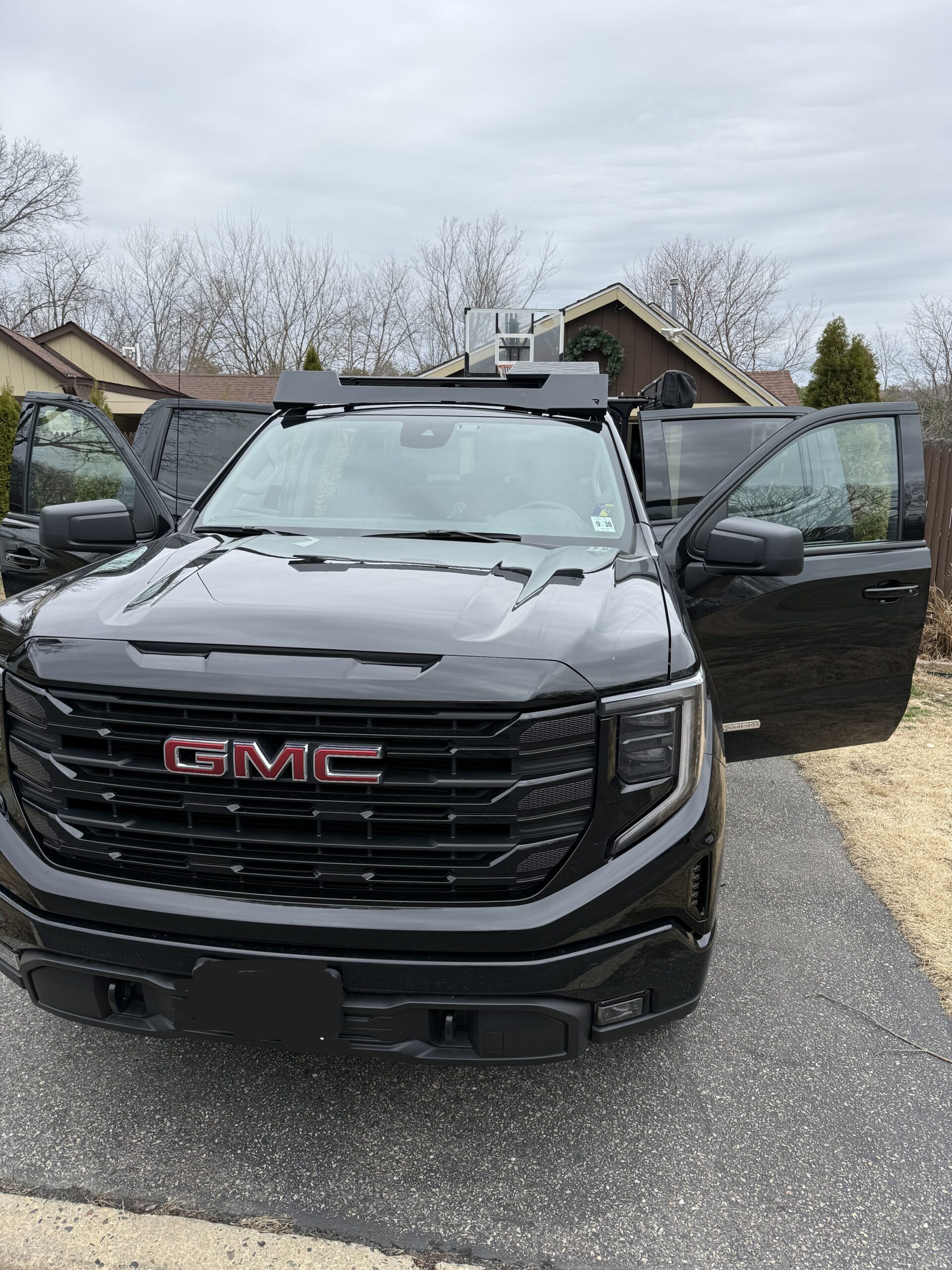
The Starlink.com link is my customer referral. You pay the same hardware price.
Why Starlink on an Overlanding Rig
When GMC sells you a Sierra, they push OnStar pretty hard and give you 3 months free. It costs $36 a month for their built-in wifi hotspot, which is just okay for checking email in a Walmart parking lot. Take that truck 30 miles outside of cell coverage — which is kind of the whole point of overlanding — and OnStar gets slower than it already is.
I was paying $36 a month for something I couldn't use where I actually needed it.
So I cancelled OnStar and got Starlink, $50 a month. Fourteen bucks more. It works where there's open sky, which on a roof rack you've got. I connected the infotainment to Starlink wifi. Caveat: I can't run Apple CarPlay wireless and Starlink wifi on the phone at the same time. I had to plug the phone into the dash USB. Still messing with that.
The bigger thing: OVS Bushveld roof top tent popped, kids on tablets, wife and I by the fire, everybody's got wifi at camp. That's worth it.
At home, not on a storm: backup internet, or leave it on the truck in the driveway. OnStar will never do that.
The Setup Overview
- Kit (this truck): Starlink Standard Kit. Starlink’s current name for that hardware is Standard 4 X — V4 kickstand dish + Router 3. Same antenna as Standard 4 / 4 X. Not Mini. Not Standard Actuated (no aiming motors). Matching accessories: Roof Rack Mount | Standard 4 or 4 X, and Mobility Mount | Standard 4 or 4 X. “Rental” on a home account is a billing program, not a different dish; this Roam kit and a home 4 X are still two kits.
- Location: Bolted to the roof rack crossbars over the driver side.
- Cable: Along rack → zip-tied to the crossbar → rear window weather stripping → down the cab-to-bed gap → grommet → into bed.
- Power & router: MOLLE panel in the bed, house-style Starlink wall mount.
- Power source: Bed outlet while driving, EcoFlow DELTA 3 Ultra at camp (sized — see power section).
- Hardwiring: None. Plug-and-play and removable.
That last part was non-negotiable. Arthritis in my right foot makes crawling under dashboards miserable. I didn't want to void a brand-new truck. Bolt-on, plug-in, reversible.
Roof Rack — RealTruck Ceros Low Profile
I needed somewhere to put the dish. RealTruck Ceros Low Profile: built-in wind fairing, sits low, crossbars for the Starlink, a case for the DeWalt LightRanger 4000 and chairs.
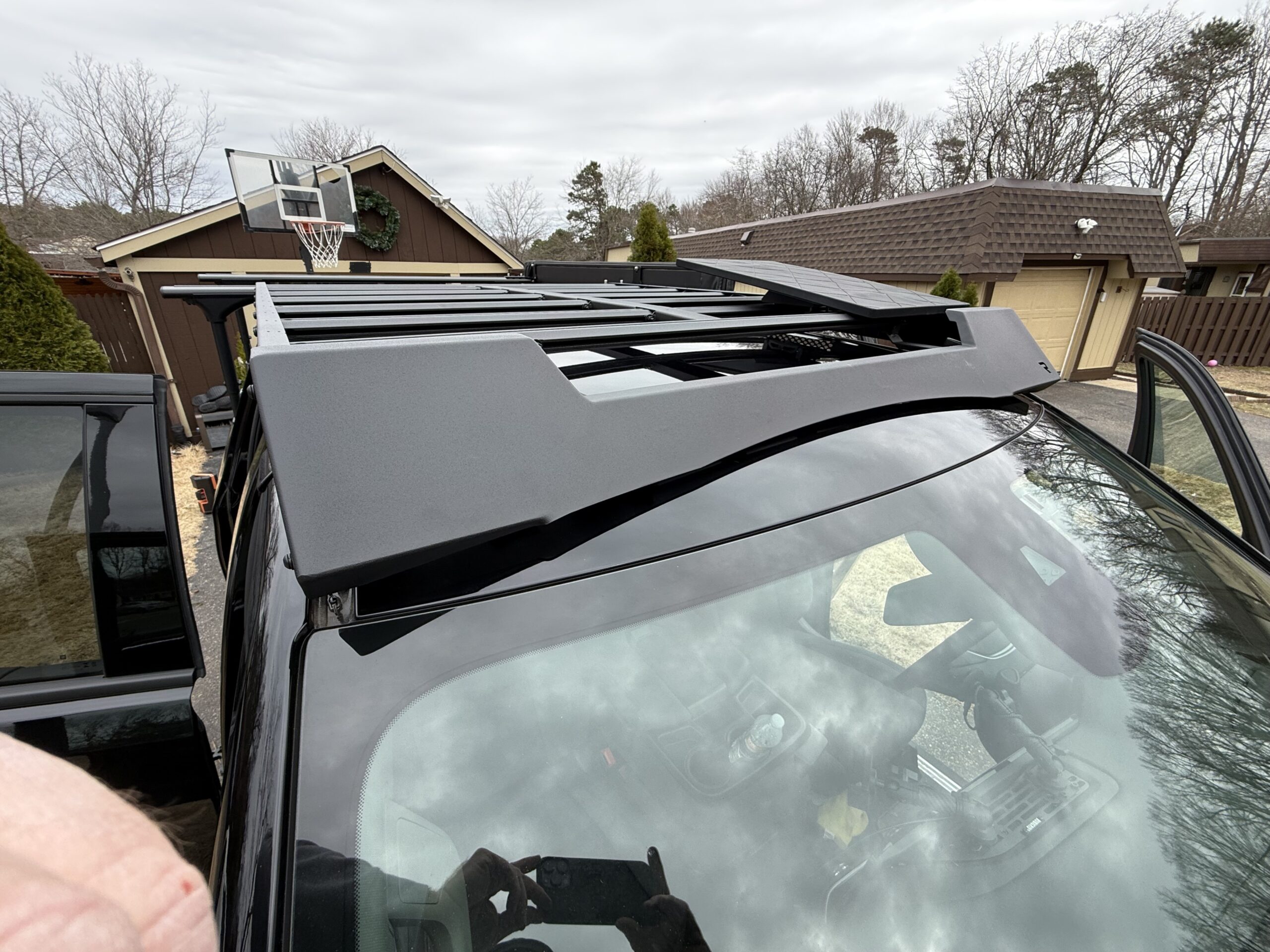
Install was straightforward. Kit has the hardware. About four hours alone; would have been an hour if my foot wasn't acting up.
The fairing matters. Without it you get a low whistle at highway speed. With it, basically silent up to about 55 mph. I take back roads to work, so I barely get over 55.
Mounting the Dish
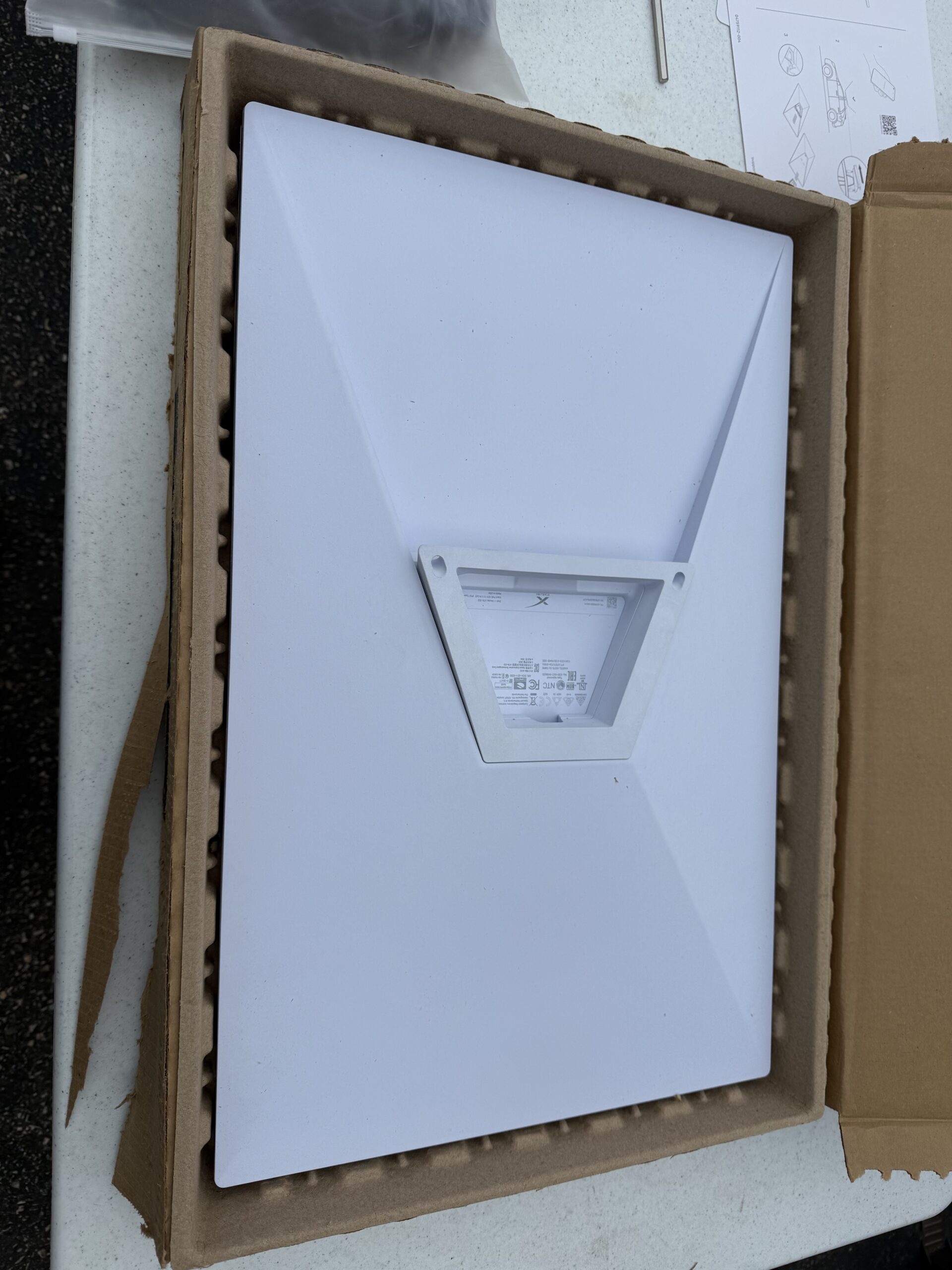
Standard comes with a kickstand for a table or the ground. I wanted it bolted down and road-ready.
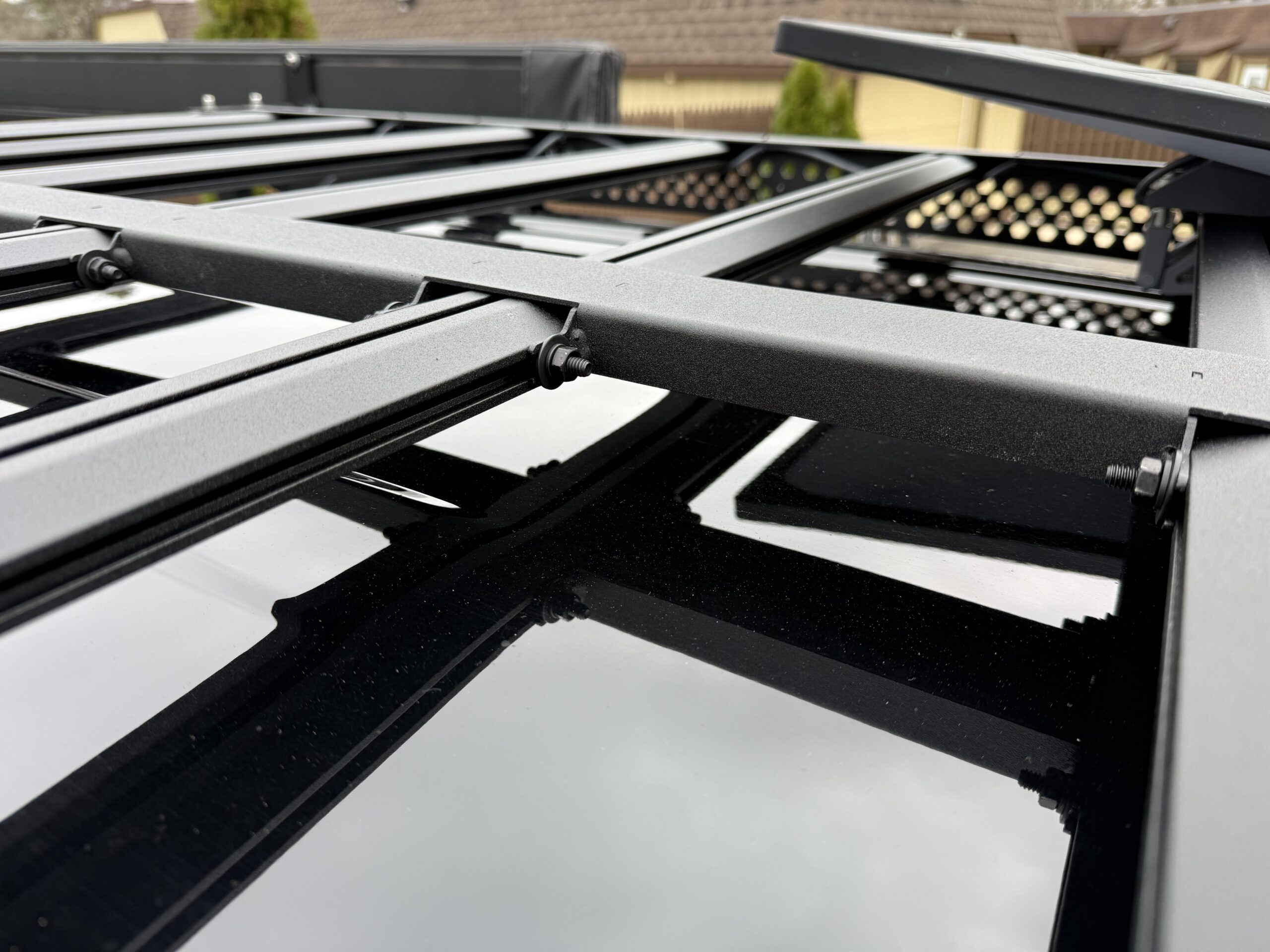
Starlink roof-rack mount hardware bolted to the crossbars with stainless. Solid, no wobble. Dish sits slightly up at about 8 degrees, low on the rack.
White dish on a dark truck looks like an ambulance. Black protective cover changed the vibe. Doesn't kill signal. Hail, branches, debris — worth it.
Cable Routing
Most truck installs drill a hole or abuse the third brake light. I didn't.
Cable runs along the rack rail, zip-tied to slits that were already there. At the back of the cab it goes down between cab and bed, along the bed, behind the MOLLE panel to the mount.
The weather-stripping trick is the move. Rubber seal along the top of the rear window has enough give to press the round Starlink cable in. Barely visible. Not pinching. Not breaking the seal in a meaningful way.
From there it drops through the cab-bed gap and a grommet into the bed. Grommet routing isn't as clean as I want yet. I'll update when it's dialed. Two extra grommet holes got zip-ties to take pressure off the left grommet.
MOLLE Panels and Swing Case
MOLLE panels on both bed sidewalls. Stake-pocket mounts, no drilling. About 20 minutes a side even moving slow.
I already had a RealTruck swing case on the driver side. Had to cut the MOLLE panel about 7" × 3" for the latch. Multitool, metal blade. Not pretty. Hidden when the case is closed. Rest of the panel still takes pouches.
Power Adapter and Router Mount
Standard Kit (4 X class) has two boxes that need a home: power adapter and Router 3. Not Mini. Not Standard 4 + Router Mini. Not Standard Actuated.
I used a house-style Starlink wall mount on the passenger MOLLE. Snaps both units in. Looks factory.
While driving: Power adapter into the factory 120V outlet in the bed. Truck running, Starlink running.
At camp: Bed outlet is dead. Unplug from the truck, plug into the EcoFlow DELTA 3 Ultra.
Power (manufacturer table, not a reading from this Sierra): Starlink Help Center row for Standard 4 / Standard 4 X / Enterprise is average 75–100W, idle 20W. Do not use 50–75W — that band is Standard Actuated only. I did not log truck draw from the app or a meter for this page. Size camp runtime in the power station runtime calculator with *your* number plus inverter losses and heater-in-snow extra. Solar on the EcoFlow during the day helps. I am not claiming “days.”
No inverter. No fuse tap. No 10-gauge through the firewall. Unbolt the dish, pull the cable, unsnap the bracket, gone.
OnStar vs Starlink Math
| OnStar Hotspot | Starlink Standard Kit (4 X class, this truck) | |
|---|---|---|
| Monthly | $36/mo | $50/mo (confirm current) |
| Hardware | Included with truck | Dish + router (confirm current kit price) |
| Off-grid | Needs cell | Satellite, needs sky |
| Camp | Barely outside the cab | Whole site |
| Home / cabin | No | Yes |
| Removable | No | Yes |
Fourteen bucks a month more than OnStar. If you only do campgrounds with cell, save your money. If you go where we go with a family, that's the easiest call on this build.
Starlink availability / order (referral)
What's Next
- Finish grommet routing
- Real speed tests (highway, camp, trees vs meadow)
- Cold weather — dish heater draws more. Size that in the runtime calculator before a winter trip
- Long-term: bugs, sap, UV
Check payload with the vehicle profile. Check aero with the fuel and range planner. Fairing does most of the work.
Parts
- MOLLE bed panels — Check price on Amazon
- RealTruck swing case — Check price on Amazon
- Starlink wall mount — Check price on Amazon
- Cable hider — Check price on Amazon
- Protective cover Standard — Check price on Amazon
- Starlink Standard / Mini kit — Starlink official (referral)
Plus the RealTruck Ceros Low Profile rack.
Bottom Line
I sold the Rubicon during COVID, ran an Accord, then a Canyon, now this Sierra. Building it piece by piece has been good for my head.
Starlink changed how the family uses the truck. Wife suggesting overnights. Kids have wifi. I can pull radar when the sky looks sketchy.
Some forum guys call it cheating. Those guys probably don't have three kids and weren't running generators in 100-degree heat after Helene so people could keep insulin cold. Connectivity saves lives. Having it doesn't mean you have to live on it.
Hardware was dish, cover, mount, hider — plus $50/month. Minus the $36 OnStar hotspot, the real monthly delta is about $14. Confirm current prices before you copy the math.
Related runtime tools
- Appliance runtime: all pages
- Fridge Runtime on a Power Station
- CPAP Runtime on a Power Station
- Space Heater Runtime on a Power Station
- Chest Freezer Runtime on a Power Station
- Well Pump Runtime on a Power Station
- Sump Pump Runtime on a Power Station
- Portable AC Runtime on a Power Station
- WiFi Router Runtime on a Power Station